Add one or more tests to a testsuite directly from the Repository list
At the moment, managing a testsuite is a bit of a pain due to the way the search function works inside the testsuite modal, in the sense that when searching for a specific test, the results are not “filtered”, instead if there is a matching the test is highlighted with a border.
Our repository has over 350 test cases and it’s a pain to have to scroll down the list of tests in order to visually pinpoint the highlighted matched test(s).
An alternative to the above for me would be the ability to add one or more selected test(s) to one or multiple testsuite(s) directly from the repository, something like this:
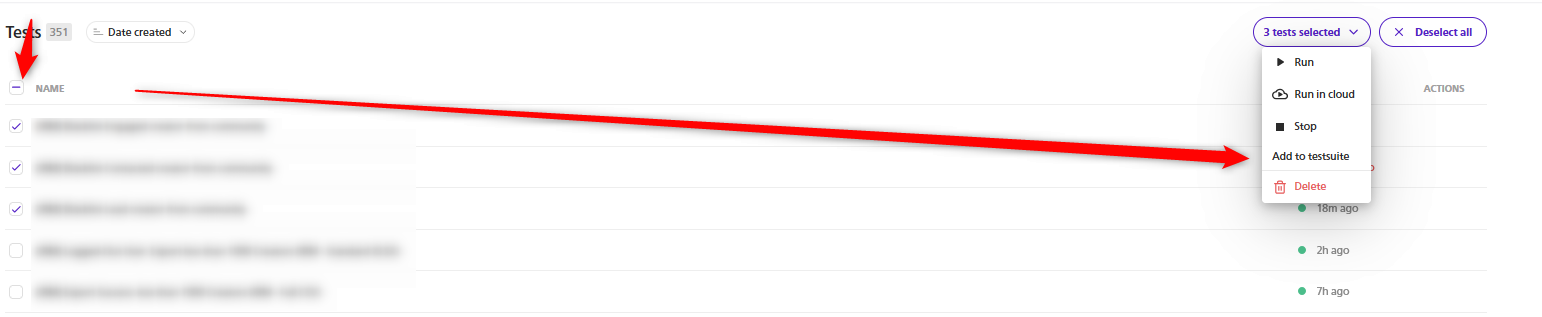
After clicking that, a modal would appear with a list of testsuite(s), and I could select one or more testsuites from there as a destination.
Log in to comment and vote
Comments3
Paweł Bylina
Oct 8, 2025
I forgot to mention that this feature has arrived!
Paweł Bylina
May 9, 2025
@Marius COJOCARIU What should we do next? Should we add them to the end of the test list? Order matters in many suites.
Marius COJOCARIU
May 11, 2025
By default I would say yes at the end of the list (equivalent of simply pressing the + button in the left column button during test suite editing).
So basically:
Open the test
Click on the “Add to testsuite” button
A modal opens where I can search and select one or more testsuites
I can see how this behaviour would be very useful for our usual work flow because all our tests are independent and encapsulated so their execution order isn’t important.
If further adjustement would be needed such as the order, I could go to the testsuites and edit it there.