Copy tests between projects
Currently I am considering creating a new project in my dashboard, that uses different settings and variables, and I'd like to also transfer one or more tests from an existing project to this new one.
Currently there is no option for this, so my only choice would be to manually create each test one by one, create the groups, and then copy set of steps in the groups, which would take a huge amount of time.
It would be nice if we could easily copy tests between projects.
Extra kudos: doing the same with other entities such as testsuites, schedules, variables etc.
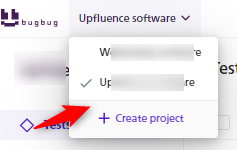
Btw, by projects I refer to this:
Log in to comment and vote
Comments6
Aug 17
PinnedThis feature has been accomplished by implementing export & import functionality of a single test
https://feedback.bugbug.io/p/importexport-feature-for-tests
Ken Lyle
Dec 4, 2025
Michal kindly gave me an alternative:
For now copy-pasting steps is the only way to move tests between projects inside the same organization.
Jahid
Nov 21, 2025
Copy & pasting entire tests between projects is a very much needed feature.
Copy & pasting a set of test steps is really time consuming, and again this is a manual task, which may results in missing some steps accidently from copying.
Paweł Szewczyk
Mar 6, 2024
"collisions between component or variable names in different projects"
maybe integrate a part of name with name of project? And replace with new project name only this part of test name?
Paweł Bylina
Jan 26, 2024
@Marius COJOCARIU You can copy the entire project. I think that would be better than starting from scratch.
What about your idea - yes, I think it would be nice. This is also challenging because there might be collisions between component or variable names in different projects. The final cost of implementation is very high because of this, unfortunately.
Marius COJOCARIU
Jan 26, 2024
I just checked the documentation (I think I should have done this from the start), and found out now how to duplicate a project (which was also my initial idea, but couldn't find how to do it):
https://docs.bugbug.io/organizing-tests/projects#duplicating-a-project
I admit I don't ever go to the "welcome" page of my "organization". 😅 But switch between projects from the top left corner navigation menu.
I was looking in the project settings hoping to find a duplicate option, I think I'll make a separate feedback post for this: